At a glance
- The video’s map at 1:24–1:26 labels Barge anomaly in the northwest. Spawn-to-landmark travel is edited, so this is a landmark route rather than a turn-by-turn path from every spawn.
- Most of the demonstrated ship route does not require keys. A lower branch contains locked crates; the optional crane extension uses a Port Crane Key.
- The author corrects his own crate-location assumption at 4:16–5:37. Container placement or type can differ, and the example’s weapons and blueprints are not guaranteed drops.
Read the new map borders and markers
Since .205, a loot zone’s border shows its rarest possible loot; hover over it to inspect the list. That is not a guaranteed item spawn. Monster lairs appear on the map only after you come within 30 m, then remain marked until neutralized or the raid ends. See Monster Lairs.
Sources: Update 0.4.0.205
Choose the variant and prepare space
- Select Cargo Port and confirm Isolated if you want to follow the author’s PvE example. Check the variant and current extraction information before deploying.
- Bring a weapon you can use against Devourers, charged medicine and free carrying space. The example uses a shotgun, a large backpack and a Robot Dog; these are an example loadout, not mandatory unlocks for entering the ships.
- Locate Barge anomaly on the raid map and navigate to the broken ships beneath the floating ship cluster.
- If using Rotation in Isolated, expect the selected variant to change after each visit under update 0.4.0.156. Do not assume your next run will reproduce this layout.
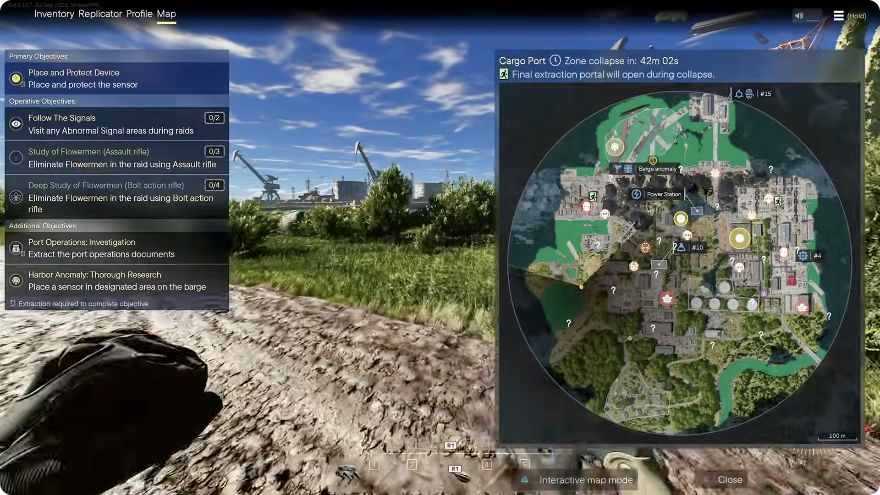
Video checkpoint at 1:26: Barge anomaly is the northwest landmark for this run. Use your own raid map to navigate from your spawn; the recording cuts some travel.
Sources: SiNisterFPS: Cargo Port run, October 2 · Update 0.4.0.156
Follow the ship portals, then search each deck
- Use the ground-level broken ship approach shown at 1:41–3:17. Clear Devourers before crossing exposed gaps; the author warns that you can fall between separated hull pieces.
- Follow the portal route onto the floating ship. At 3:17–3:41 the author deals with two enemies on arrival; check the destination before searching containers.
- Search the accessible deck and containers instead of stopping at one remembered crate position. At 4:16–5:37 the author finds different container types or positions from his previous visit.
- At 6:14–7:35, distinguish the lower locked-crate detour from the portal that continues the route. Return from the detour and use the upper portal shown around 7:35–7:39 if you are proceeding without those crate keys.
- Continue through the accessible ship sections only while ammunition, healing, space and extraction time allow. Mark where you can retreat before taking another portal.
Add the crane only if you have its key
- Treat the crane as an optional extension. The author begins this part at 19:45.
- Follow the crane’s ladder and check the locked-door prompt against your key before committing to the detour.
- The demonstrated door uses a Port Crane Key. Enter, search the interior, then resume your extraction plan rather than trying unrelated keys on every lock.
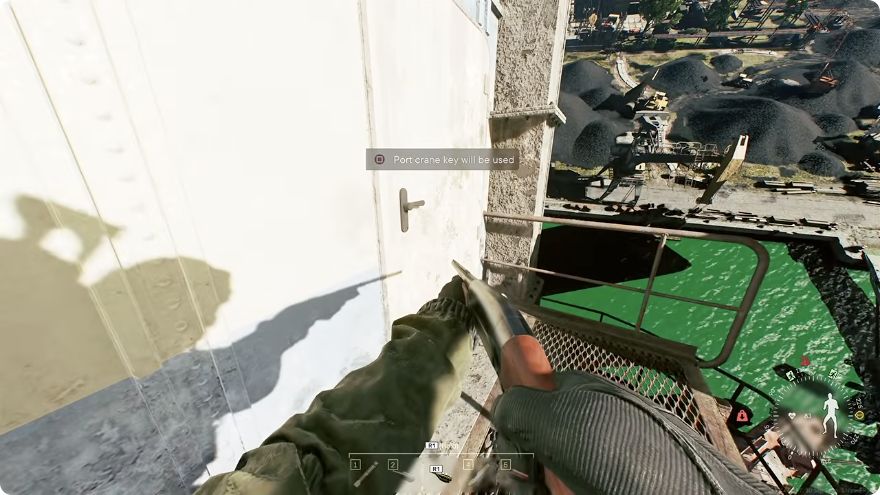
Video checkpoint at 20:09: the door prompt names the Port crane key. This verifies the demonstrated lock, not the current crafting recipe or the rules for every key.
Check Robot Dog extraction before leaving the loot
At 14:06–16:43, the author’s first Robot Dog extraction attempt does not work at that location. He moves back toward the earlier approach and successfully sends the dog away. This is an observed fallback in one run, not proof of a fixed universal extraction point.
- Transfer the items you intend to send out and issue the extraction command.
- Check that the dog can actually leave. If it cannot, move to an accessible position along the cleared approach and retry, as shown in the video.
- Update 0.4.0.156 lets the owner cancel the extraction command. Use that option when you need to reposition it.
- Confirm the extraction outcome before treating the transferred items as secured, then extract yourself using your raid’s current exit.
Sources: SiNisterFPS: Cargo Port run, October 2 · Update 0.4.0.156
Treat blueprint unlocks as an outcome, not a guarantee
The raid summary at 23:42–24:41 shows the author returning with weapons and reporting several blueprint unlocks. That outcome depends on what he looted and which recipes his account already knew.
- Prioritize an extracted item you actually need over duplicates that only fill your bag.
- Extracting an item can unlock its available fusion or replication recipes under the official crafting system. It does not mean that every listed weapon is guaranteed to appear here.
- If the desired blueprint is still missing, inspect its actual unlock requirement in Replicator rather than repeating the route on a promised drop rate.
Sources: SiNisterFPS: Cargo Port run, October 2 · 250 Shades of Liberty
Sources & references
- SiNisterFPS: Cargo Port run, October 2Video
Full 25-minute transcript obtained through the Codex in-app browser; map and route checkpoints visually sampled. One creator run, not an independent playtest.
- Update 0.4.0.156Official
Isolated Rotation and cancellation of Robot Dog extraction commands.
- 250 Shades of LibertyOfficial
Extraction unlocks available item recipes.
- Ship approach at 1:41Video
Ship approach checkpoint in the same October 2 run.
- Portal branch at 6:14Video
Locked-crate detour before the continuing upper portal.
- Crane extension at 19:45Video
Optional crane approach before the verified key-door prompt.
- Update 0.4.0.205Official
Update 0.4.0.205