At a glance
- Check whether the blueprint is already available. Otherwise, extract the item or meet the unlock condition shown for that recipe.
- Charge a replication blueprint with the required mix of six Chronotrace types, then place it in a normal production queue.
- Use Workshop → Fusion for component recipes. Since update 0.4.0.156, Fusion has its own Workshop tab rather than sitting inside Replicator.
Fusion or replication: choose by the input
Use Workshop → Replicator when you have a blueprint to charge with Chronotraces and produce copies. Use Workshop → Fusion when the recipe asks for specific items or remains. Refiner dismantles items; it is not the Fusion menu.
Read the possible output before spending a rare component. Since .192, reducing the number of Fusion runs returns surplus inputs from the Workshop to storage. Check your stash before assuming those materials disappeared.
Sources: Update 0.4.0.192
Replication and Fusion compared
Workshop has separate Replicator and Fusion tabs. Replication uses Chronotraces and a production queue; Fusion uses the exact components and cost displayed by its recipe.
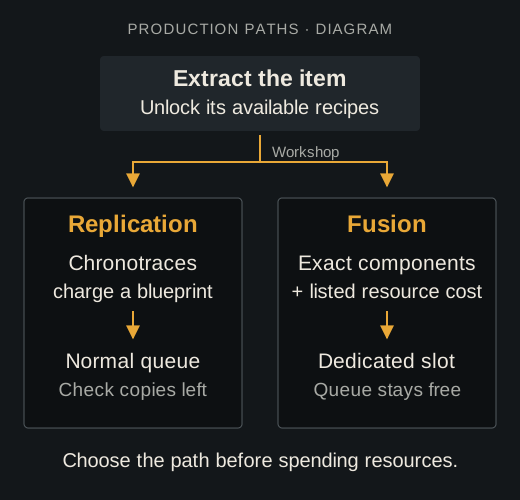
Process diagram: both paths start with a learned recipe, but they use different inputs and slots. Fusion has its own Workshop tab and leaves the replication queue free.
Sources: Update 0.4.0.156 · Update 0.4.0.182
Replication workflow
- Check whether the blueprint is already available. Otherwise, extract the item or meet the unlock condition shown for that recipe.
- In Workshop > Replicator, open the blueprint and read each Chronotrace requirement before spending resources.
- Add Metal, Composite, Fiber, Chemicals, Energy, and Idea traces until the blueprint is fully charged.
- Place the charged blueprint in a replication queue and confirm the production time.
- Collect the item when complete. Refill the replication limit before the blueprint reaches zero remaining copies.
Sources: Update 0.4.0.182
Fusion workflow
- Open Workshop → Fusion, the separate tab next to the other Workshop production tools.
- Choose a learned recipe and inspect the exact component names. Similar-looking books, parts, or objects are not substitutes.
- Move every required component into the recipe and confirm the Active Matter cost.
- Start Fusion, collect the result, and verify it entered storage before leaving the screen.
Sources: Update 0.4.0.156
Starting recipes and production times
Update 0.4.0.182 changes which recipes you need to unlock first. An available recipe still needs its listed resources before production.
- Available from the start
- AI-2, small UHMWPE plate, PP-91 Kedr, Bayonet KnifeBoth Fusion recipes and Replicator blueprints are available. Distorted remains also have a starting Fusion recipe.
- 30 seconds
- AI-2 and small UHMWPE plateReplication time in update 0.4.0.182.
- 10 minutes
- PP-91 Kedr and PM-63Replication time. This does not mean PM-63 is a starting blueprint.
Sources: Update 0.4.0.182
Missing recipes and production problems
The recipe is missing.Check the starting recipes, then extract the item or complete its required Investigation. Search the correct Workshop tab: Replicator for replication, Fusion for component recipes.
The blueprint is visible but locked.Open its resource detail and charge every required Chronotrace category.
Replication is charged but unavailable.Check the remaining replication count, queue capacity, and any Monolith or cycle access condition.
Fusion rejects a component.Match the exact item name shown by the recipe. A generic item of the same type does not count.
Sources & references
- 250 Shades of LibertyOfficial
Current recipe unlock, blueprint charge, replication limit, and Fusion rules.
- Update 0.4.0.55Official
Dedicated Fusion slot.
- Update 0.4.0.62Official
Workshop entry, Replicator sub-tab, and available-recipe filters.
- Replicator interface clarificationCommunity
Historical community-manager clarification; the later .156 update supersedes its Fusion menu location.
- Update 0.4.0.156Official
Use Workshop → Fusion for component recipes. Since update 0.4.0.156, Fusion has its own Workshop tab rather than sitting inside Replicator.
- Update 0.4.0.182Official
Update 0.4.0.182 changes which recipes you need to unlock first. An available recipe still needs its listed resources before production.
- Update 0.4.0.192Official
Update 0.4.0.192