At a glance
- Prime and Merits persist after a wipe under update 0.4.0.122. The one-time Prime bonus from your edition is not granted again.
- Since update 0.4.0.156, equipped gear moves to a temporary stash. Shelter-placed items stay in place, but weapons or equipment preserved there can become unusable decoration.
- The September 29 recording shows an actual reset and a permanent Replicator Module choice. Its displayed build is 0.4.0.145, so its “all items” loss text must be read with the later .156 exceptions.
Choose between Cycle access and a reset
For Cycle offers, check Harmonization access. For a permanent reset reward, follow the Personal Timeline checklist. Buying Cycle access does not itself complete the Monolith or grant its reset reward.
If a Harmonization reward is unavailable, read the Monolith unlock requirement: .208 adds a hint for this condition. Choose the unlock that removes your current bottleneck, and check the current price rather than relying on a promised tokens-per-hour route.
Sources: Update 0.4.0.208
Prepare before opening the Monolith door
- Finish the Monolith progression. The recorded walkthrough reaches Access Level Mu, opens Create a Personal Timeline, then displays the loss preview and reward selection.
- Read your own current confirmation panel and saved-item preview. Postpone activation if a loss or reward is not what you intended.
- Prepare the equipped gear you want to carry forward. The .156 rule moves equipped gear into temporary storage; the author reports that his worn loadout and backpack contents appear there after the reset. Check your preview rather than assuming your whole stash follows.
- Choose the permanent reward for the bottleneck you actually have. The September developer Q&A says there is currently no way to revert a chosen permanent Monolith reward.
- Confirm the selected reward and create the Timeline only when you accept restarting progression. Check the resulting temporary stash and the Monolith afterward.
Sources: SiNisterFPS: reset recording, September 29 · Update 0.4.0.156 · September 7 developer Q&A
Check the asset impact, including the newer exceptions
The recorded loss panel at 6:09 is build 0.4.0.145. The September 26 patch changes gear and Shelter preservation; those newer rules take precedence over its broad “all items” wording.
- Prime and Merits
- PersistOfficial .122 tooltips confirm both. Edition Prime is a one-time bonus, not a reset refill.
- Credits, Chronotraces and Monolith Tokens
- Listed as lost in the recorded panelBudget for rebuilding; verify your current preview before committing. The later preservation patch does not announce protection for these resources.
- Blueprint progression, player levels and Monolith levels/unlocks
- Listed as reset in the recorded panelPermanent rewards and the Fundamental Protocol access exception are separate from ordinary progression.
- Equipped gear
- Moved to a temporary stash since .156This is not a blanket promise to preserve unequipped stash contents. Retrieve the carried gear after the reset.
- Equipped Chronogenes
- DiscardedThe .156 patch explicitly keeps this loss rule. Gear preservation does not protect these equipped effects.
- Items placed in the Shelter
- Stay in their locationsWeapons and equipment left this way can become decorative and unusable in loadouts.
- Edition content
- Returns to the stash except PrimeThe official FAQ gives this edition-specific rule. Do not extend it to every item you looted or purchased later.
- Fundamental Protocol access
- Persists once unlockedThe official September 24 update makes this a specific exception after unlocking it at DELTA.
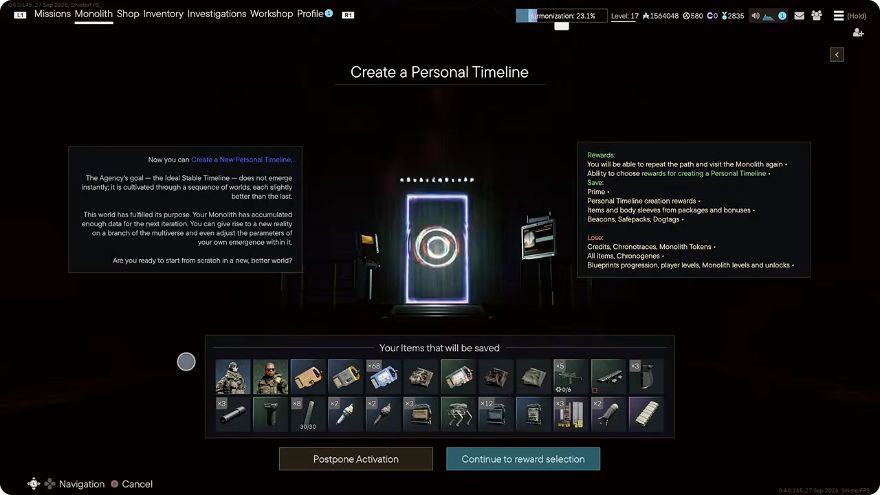
Recorded confirmation at 6:09, displayed build 0.4.0.145. Read its loss panel alongside the later .156 equipment and Shelter exceptions; do not copy its all-items wording as the current preservation rule.
Sources: SiNisterFPS: reset recording, September 29 · Update 0.4.0.156 · Update 0.4.0.122 · Official FAQ · The Fundamental Protocol
Choose the reward that removes your bottleneck
If you regularly leave production idle, an extra module may help less than fixing storage or objective capacity. Choose for your own play pattern rather than copying the author’s edition-specific selection.
- Replication throughput
- Inspect Replicator ModuleThe author chooses it and demonstrates two simultaneous production rows at 9:58–10:37. A queue place and an additional working module are different benefits.
- Storage or objective capacity
- Compare the offered permanent upgradesCheck which offers are already ticked on your account. The author has edition benefits; his available choices are not a universal starting set.
- Rebuilding resources or a sleeve unlock
- Read the alternative reward offersThe recording shows reusable token offers and sleeve options. Verify the actual offer and whether it is permanent before selecting it.
Separate resetting from buying Cycle access
The September Cycle walkthrough describes access through resetting or through a purchase offered in the Harmonization screen. Buying access does not mean you have completed a new Monolith progression or selected its permanent reset reward.
- Reset when you want another progression run and its permanent reward, and can accept rebuilding.
- If your immediate goal is Cycle offers, inspect the access options and price in the current Harmonization screen first. Do not reset solely because you assume it is the only entry route.
- The official Q&A separates Global Progression rewards from Cycle Offers bought with Merits. Joining a Cycle does not automatically claim every offer.
- The Q&A says previous participants with rewards should not need to buy access to that previous Cycle again. Items marked exclusive have separate availability rules; do not assume all rewards return later.
Sources: Harmonization Cycles Q&A · SpicyBeanDip: Cycle access walkthrough
If the Replicator Module seems missing
- Inspect the selected permanent reward in the Monolith and your Workshop after returning.
- In the recording, the additional production row appears after the author completes a raid with objectives and reports the contracts. Try completing and claiming the introductory progression that is actually shown on your account before treating the reward as lost.
- Reopen the Workshop and check the working rows. The author demonstrates simultaneous production afterward; a change in queued items alone is not the same check.
- If the chosen reward still fails to appear, retain the selection and claim records for support. The video demonstrates one account’s activation sequence, not a guarantee that any raid fixes every missing reward.
Sources & references
- SiNisterFPS: reset recording, September 29Video
Browser-exported automatic transcript and sampled confirmation screen at 6:09. Displayed recording build .145; creator is an Active Matter partner. Later patch rules take precedence.
- Update 0.4.0.156Official
New equipped-gear and Shelter preservation rules; equipped Chronogenes still discarded.
- Update 0.4.0.122Official
Prime and Merits persist after wipes.
- Official FAQOfficial
Edition contents return except the one-time Prime bonus.
- The Fundamental ProtocolOfficial
DELTA unlock and Protocol access persisting after reset.
- Harmonization Cycles Q&AOfficial
Repeat progression Merits, reward categories, previous participation and exclusivity.
- September 7 developer Q&AOfficial
No reversal of the permanent reward choice at that time.
- SpicyBeanDip: Cycle access walkthroughVideo
September 29 browser-exported transcript, 0:52–1:41. Creator advice, not an official pricing table.
- Update 0.4.0.208Official
Update 0.4.0.208